 Sergio Carracedo
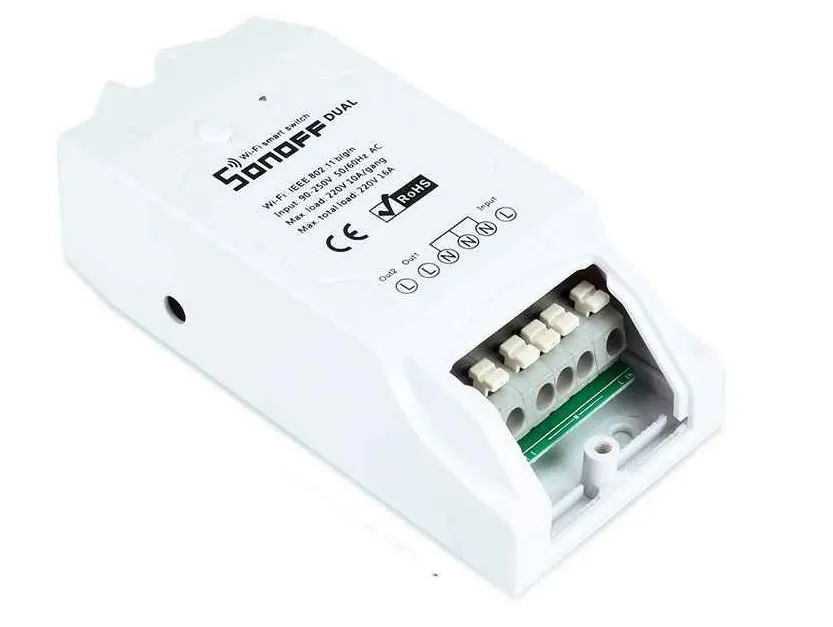 A few months ago, I bought this little gadget: a Wi-Fi switch, with the intention of trying to “smart-ify” something at home.
This specific model is dual-channel, so it has two switches in the same device, but for this project, a single channel is enough.
Like most of these low-cost devices, it is based on the chip ESP8266, originally used to provide Wi-Fi connectivity to Arduinos, but which has proven its reliability when used independently.
Since it was my first test, I didn’t want to overcomplicate things and decided not to flash it or anything like that, using the “original” software instead.
After thinking about what to “smart-ify” for a while, I found a candidate. My desk lamp, the one I always left on when I got up from my desk 😅.
The installation process for the Wi-Fi switch was very simple: cut the power cable and connect it to the new one.
⚠️ I think it goes without saying that for any wiring manipulation: always keep the lamp unplugged ⚠️
Once everything was reconnected, I followed the steps indicated by the eWeLink app to sync the device, and right away I could turn the lamp on and off from my phone, which isn’t practical at all.
My idea was to make the lamp turn on when unlocking the computer and turn off when it entered power-saving mode (monitor off).
While researching, I found a way for dbus to launch commands when the Gnome screensaver state changes.
lamp.sh
dbus-monitor --session "type='signal',interface='org.gnome.ScreenSaver'" |
  while read x; do
    case "$x" in
      *"boolean true"*) echo "SALVA PANTALLAS ACTIVADO, APAGAR LAMPARA";;
      *"boolean false"*) echo "SALVA PANTALLAS DESACTIVADO, ENCENDER LAMPARA";;
    esac
  done
This lamp.sh file must be launched at the start of our session every time we boot the machine, so the simplest way is to add it to the Gnome Startup applications list.
Now I just needed to be able to send those events to the Wi-Fi switch management server, the same way the mobile app does.
What the switch does when we sync it is connect to an external server (this is the part I like the least, but it can be changed) and wait for commands. Using IFTTT, we can link an eWeLink (or Sonoff) device with an event; in this case, the event is a webhook that allows us to call a URL to execute the action.
This webhook looks like this: https://maker.ifttt.com/trigger/[nombre_del_evento]/with/key/[la_key_que_te_da_ifttt]
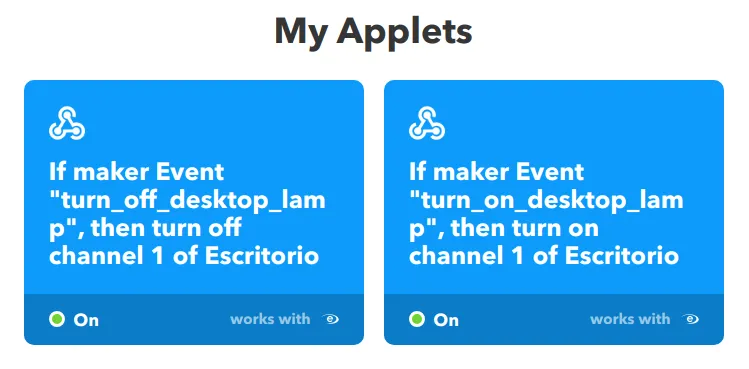
Where the event name is defined when creating it, and la_key_que_te_da_ifttt is provided to you by IFTTT when creating the first webhook: https://ifttt.com/maker_webhooks
Now all that’s left is to create two Applets in IFTTT (one to turn it on and another to turn it off) linked to the actions provided for eWeLink, and tweak our lamp.sh to call these webhooks.
lamp.sh
dbus-monitor --session "type='signal',interface='org.gnome.ScreenSaver'" |
  while read x; do
    case "$x" in
      *"boolean true"*) curl -X POST https://maker.ifttt.com/trigger/turn_off_desktop_lamp/with/key/[TU_KEY];;
      *"boolean false"*) curl -X POST https://maker.ifttt.com/trigger/turn_on_desktop_lamp/with/key/[TU_KEY];;
    esac
  done
It’s not the perfect solution, especially regarding the dependency on an external server for something so simple, but it’s a first step to build upon.
I forgot to mention that it’s also possible to connect the switch to Google Home, Alexa, or HomeKit; I’ve tested it with Google Home and it works correctly.
