 Sergio Carracedo
How to securely grant your agent access to your inbox
We are in the agentic age—nobody can doubt it. To make agents more powerful and useful, we are giving them access to our online tools: Google Drive, email, calendar, browser, Slack, GitHub… The list is endless.
One of the tools I have been reluctant to give agents access to is email.
Why giving agent access to your inbox is a very bad idea
Email is not only a communication tool for sending text and files; it is also how most services identify their users. When you register for an online service, you need an email account (or, increasingly and fortunately, you can use OAuth through another service).
Just think about what a malicious person (or agent) can do if they have access to your inbox:
- Get recovery or login codes
- Use “recover my password” to get a link to create a new password for any account associated with your email address
- Impersonate you by creating accounts on services
- Impersonate you with friends, teammates or clients.
- Get access to confidential or personal information.
The risk is very high.
Giving an agent credentials to access your inbox opens up a new attack vector and creates new risks.
- The agent could leak the credentials (this risk can be mitigated with tools like Himalaya CLI, which prevent the agent from accessing the credentials directly, but the agent would still have access to the full mailbox).
- A prompt injection can cheat the agent:
- to reveal private info (confidential info, account recovery codes, etc).
- to send an email in your name.
- The agent could make a mistake and send an email to the wrong recipient.
Finding a solution
I understand the value of giving an agent access to some emails, but not all of them, so I started thinking about a possible solution:
Dedicated email account
One possible way to mitigate the risks is to create an email account just for the bot and forward emails you think are safe from your personal account to that account.
This can work for specific and simple cases, but you need to reconfigure the forwards whenever something changes. Email filtering also depends on your provider, and not all providers offer the same filtering capabilities.
If you have multiple agents and want to give them access to different emails, you need to create multiple accounts—one per agent—which adds complexity.
It is hard (and often impossible) to limit the allowed recipients or attachments.
SirenoRelay: Give access to inbox via a relay mcp
This is why SirenoRelay was born.
SirenoRelay is a tool for Linux and macOS that provides an MCP server. You can run it via the CLI, as a service, or in a container (recommended). It acts as a relay between your agent and your email account, controlling access to your inbox and outgoing mail.
It uses Himalaya CLI under the hood as its email provider (I plan to add more providers in the future). You can define access profiles, which specify what each user or agent can and cannot see. SirenoRelay’s users are separate from your email account users: you assign a profile to each SirenoRelay user, and those rules apply to that user.
Let’s look at an example
Imagine you want to give your agent access to supermarket receipts. You can configure SirenoRelay to allow emails from tickets@supermarket.com, and, for organization, limit access to messages in the Invoices folder.
profiles:
    ticketprofile:
        folders:
            allow:
                - ro:Invoices
        inbound:
            addresses:
                allow:
                    - 'tickets@supermarket.com'
            attachments:
                allow: ["application/pdf"]
        outbound:
users:
    Agent:
        provider: default
        profile: ticketprofile
        token_hash: 6bbad1ac753370e6e4da2345aa5716d371adcd9af81b2b56d12f6f0eda5f38bb
With this configuration, the agent must use a token. You set the user’s password or token, and the tool stores its token_hash for added security. Each token is associated with a user and a profile.
It is important to note that the relay blocks anything that is not explicitly allowed. For example, because the outbound section is empty, the agent cannot send email to anyone.
The folder configuration grants read-only (ro) access to the Invoices folder. The agent does not even know that other folders exist; it can see only the ones it is allowed to access.
Even if that folder contains emails from other senders, the agent can only see (list or read) messages from tickets@supermarket.com—nothing else.
Regarding attachments, the agent only receives those that are allowed. There are two hiding modes: in one, the agent knows an email has an attachment but cannot access it; in the other, the agent is not told about the attachment at all.
You can also set rules for other things, such as the subject and body content. For example, an email will not be listed if its body contains certain words.
You can remove links from emails and use an external scanner, such as gitleaks, to check whether an email contains a secret.
The tool includes a dry-run checker to see whether a hypothetical email with certain characteristics would be allowed or denied: sirenorelay policy-check --user finance-agent --folder INBOX/Invoices.
How to install it
You can use Homebrew or ask your agent to install it automatically:
It also provides a skill to install and configure the tool, making setup easy.
Home Assistant add-on (app)
My main use case is giving the Hermes agents running in my HAOS access to my email (via an add-on I created). This lets me ask things like when I last bought cat litter—the agent can read my supermarket receipts and find the answer.
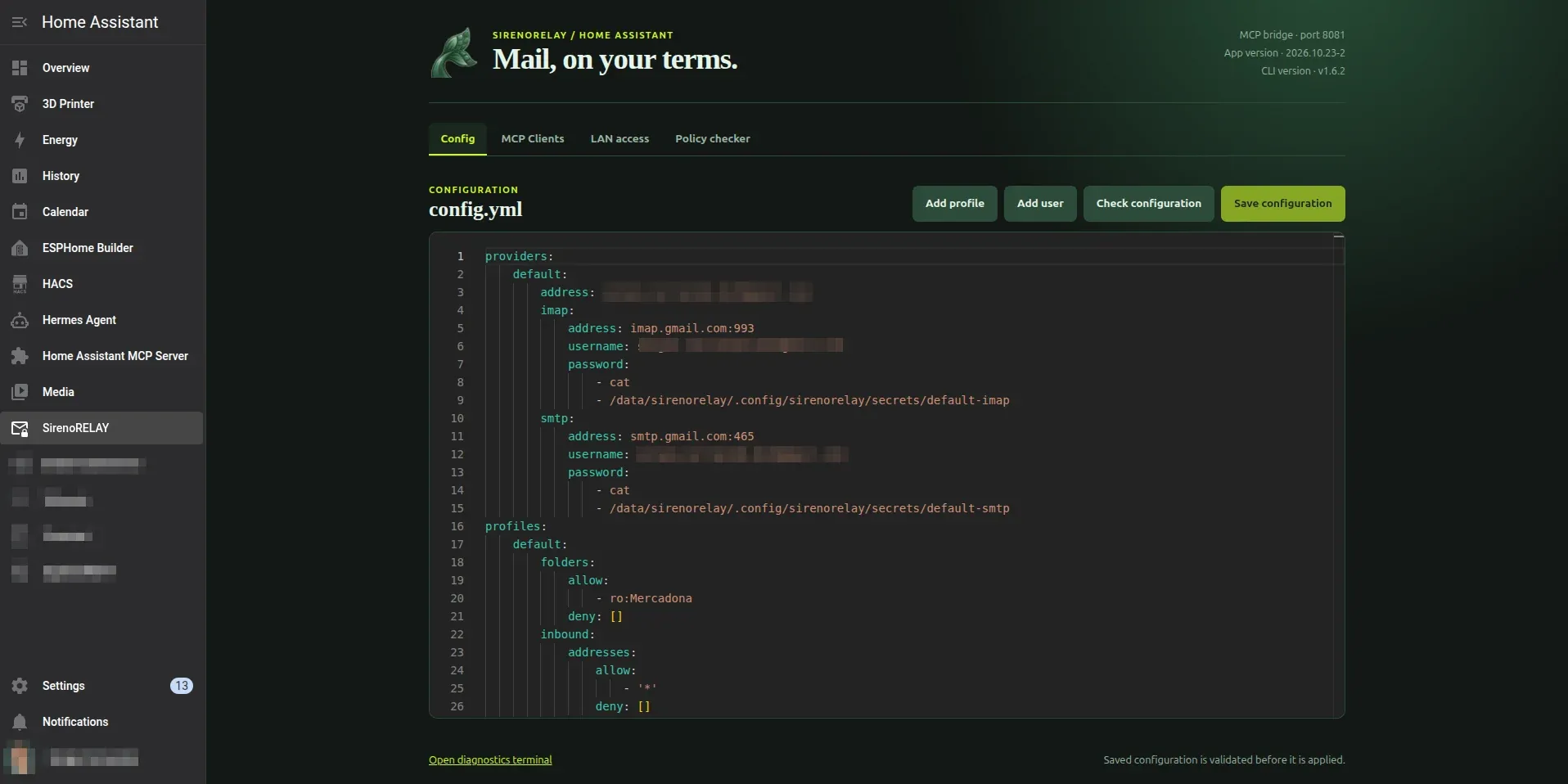
Running this service in HAOS seemed like a logical next step, so I packaged the tool as a Home Assistant add-on and provided a UI to simplify configuration:
What’s next
I plan to allow a user to use multiple profiles (with the more restrictive rule applying in case of a conflict). I also plan to continue improving the documentation and add support for more providers in Himalaya, including those that use OAuth.
